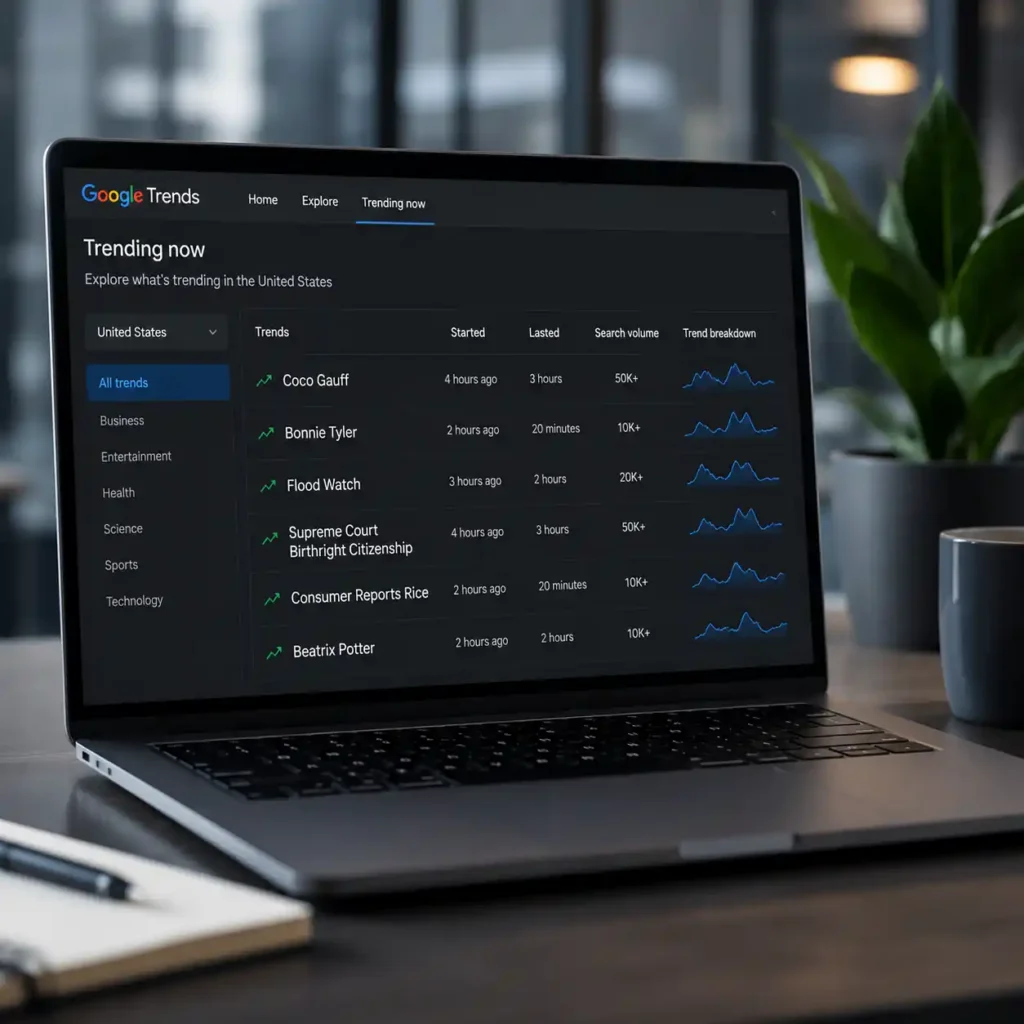

Google Trends users are noticing “Lasted” appearing on the Trending Now page across several country filters, including the United States, United Kingdom and Canada. The label can look confusing at first, especially for bloggers and publishers trying to decide whether a topic is still worth covering. But “Lasted” does not mean Google Trends is broken, and it does not mean people have completely stopped searching for that topic.
The most likely reason is simple: Google Trends is showing topics that surged earlier inside the selected time window, but their strongest live-growth phase has already cooled. In other words, the topic was searched more than usual for a period of time, then dropped back closer to normal search activity.
This is why a topic can still show thousands of searches and still be marked as “Lasted.” Google Trends is not only measuring total search volume. It is also measuring whether a query is still rising unusually fast compared with recent search behavior.
Is Google Trends showing “Lasted” today in every country?
Not necessarily in every country, but the same “Lasted” pattern can appear across many country filters because Trending Now works as a real-time surge detector. If a topic spiked earlier in the selected period and then slowed, Google may mark it as “Lasted” in that country’s trend list.
In the screenshots, the United Kingdom, United States and Canada all show multiple topics with a “Lasted” label. That does not mean all countries are seeing the exact same story. It means Google is applying the same trend-status system to different local search markets.
The selected time window also matters. When the filter is set to “Past 4 hours,” Google Trends can show topics that were active earlier in that four-hour window, even if they are no longer actively surging at the exact moment the page is checked.
What “Lasted” means in Google Trends
“Lasted” shows roughly how long a topic remained in its strongest trending phase. If a topic says it “Lasted 20 min,” Google detected a short but sharp search spike. If it says “Lasted 2 hr” or “Lasted 3 hr,” the search surge continued for longer before slowing.
According to Google’s Trends Help page, Trending Now highlights search queries that are experiencing a recent surge in interest and are connected to a newsworthy story, event, person or topic cluster. Google also says fresh trend data is refreshed on average about every 10 minutes where the feature is available.
That explains why “Lasted” appears frequently. Google Trends is measuring momentum, not permanent popularity. A topic can still have search interest after the “Lasted” label appears, but the fastest part of the spike may already be over.
Why Google Trends is showing “Lasted” today
The reason Google Trends is showing “Lasted” today is that many topics had a fast rise and then cooled within the selected period. This is normal behavior on the Trending Now page, especially during busy news, sports, weather and entertainment cycles.
For example, a tennis-related search such as Coco Gauff may rise quickly during or after a match update, then slow once people get the result. A sports query such as PGA Tour may spike around TV coverage, tee times or leaderboard searches, then fade after users find the information they need.
The same can happen with weather searches. A broad query such as “weather” can generate very high search volume, but it may still be marked as “Lasted” if the unusual surge has already peaked. That does not mean nobody is searching for weather anymore. It means the abnormal burst has slowed.
Entertainment searches can behave the same way. A song, celebrity name or death-rumor query may rise sharply because of social media discussion, then drop once users confirm the answer.
Started, Lasted, Search Volume and Trend Breakdown explained
The “Started” time shows when Google first detected the search surge. A topic that started one hour ago is newer than one that started three hours ago, but newer does not always mean stronger.
“Search Volume” gives a rough idea of how many searches the topic received during the selected window. A high number such as 10K-plus or 50K-plus can make a topic look attractive, but publishers should still check whether the topic is still active, recently lasted or already fading.
“Trend Breakdown” is one of the most useful parts of the page because it shows related searches inside the same trend cluster. A celebrity trend may include a name, song, rumor or recent appearance. A sports trend may include the player, opponent, result, schedule or TV coverage.
This is why two trends with the same search volume can have very different value. One may have a clear reader question, while another may be too vague or too short-lived to build a useful article around.
Why some trends last 20 minutes and others last 3 hours
Short trends usually happen when the search intent is answered quickly. A user may search for a result, schedule, rumor or quick explanation, find the answer, and stop searching. That can create a sharp spike followed by a fast slowdown.
Longer trends usually involve developing stories, live events or topics with multiple search angles. A court ruling, weather warning, sports leaderboard, product recall or entertainment announcement can keep generating searches for several hours because people continue looking for updates.
For publishers, the key question is not only how long the trend lasted. The better question is whether the topic still has unanswered reader intent.
Does “Lasted” mean the trend is dead?
No. “Lasted” does not mean the topic is dead. It means the strongest detected surge has ended. People may still be searching for the topic, but the query may no longer be rising fast enough to stay in an active-trend state.
This is important for bloggers because a newly “Lasted” trend can still be useful if the topic has clear search intent. A results page, explainer, fact check or schedule guide can still perform after the first spike, especially when users are still looking for context.
However, an old “Lasted” trend with low search volume and no clear reader question is usually weaker. Publishing only because a topic appeared on Trending Now can lead to thin content if the article does not answer what users actually want to know.
How publishers should decide what to cover
A trend is usually stronger when it has four signals together: a recent start time, meaningful search volume, active or recently lasted status, and a clear trend breakdown. If all four are present, the topic may be worth covering quickly.
If a trend has already “Lasted” but still has strong volume and useful related searches, an explainer can still work. For example, a title such as “Why is Bonnie Tyler trending today?” or “What does this court ruling mean?” may remain useful after the initial search burst.
If a trend has low volume, lasted only briefly and has no clear news development, it may be better to skip it. Chasing every short-lived spike can create rushed articles that do not help readers.
The same rule applies to entertainment and awards topics. Search spikes around names, nominations or schedules can still be valuable when readers need a complete list or clear context, as seen with the 2026 Emmy nominations announcement.
Common mistakes when reading “Lasted”
The biggest mistake is assuming “Lasted” means all search interest has ended. It only means the strongest trending phase has slowed.
Another mistake is treating search volume alone as enough reason to publish. A 50K-plus topic may still perform poorly if the article does not answer the specific question behind the search.
A third mistake is ignoring the country filter. A topic may be strong in the UK but weak in the United States, or rising in Canada while already fading elsewhere. The article angle should match the country where the trend is strongest.
Publishers should also check whether the trend is tied to a real news event, a social media rumor or a routine search pattern. A clear, verified update is usually stronger than a vague keyword spike.
Read More:
- How a 730-pound great white shark sighting became a major search topic
- What is known about the K2 Airways cargo plane report near Karachi
- Full list of 2026 Emmy nominations and major categories
Best way to use Google Trends “Lasted”
Use “Active” trends for urgent breaking coverage. Use newly “Lasted” trends for explainers, fact checks, results pages and practical guides. Avoid older trends unless there is a fresh update or a strong evergreen question.
The best way to read “Lasted” is to combine it with Started time, Search Volume, Trend Breakdown, country relevance and real news value. The label is useful because it shows when the fastest search window may have passed, but it should never be used alone.
For anyone checking Trending Now today, the main takeaway is clear: Google Trends is showing “Lasted” across countries because many searches surged earlier in the selected time window and then cooled. It is usually a normal trend-status signal, not a sign that Google Trends is failing.

Make Swikblog your go-to source on Google for reliable updates, smart insights, and daily trends.